
Container infrastructure

Expanse
The visual IDE for Docker Compose
Design container infrastructures on a visual canvas, deploy them in one click and follow them in real time.
From visual architecture to deployment without writing YAML by hand. Expanse generates the Compose file and talks directly to Docker Engine.
Screenshots
The canvas and the running stack
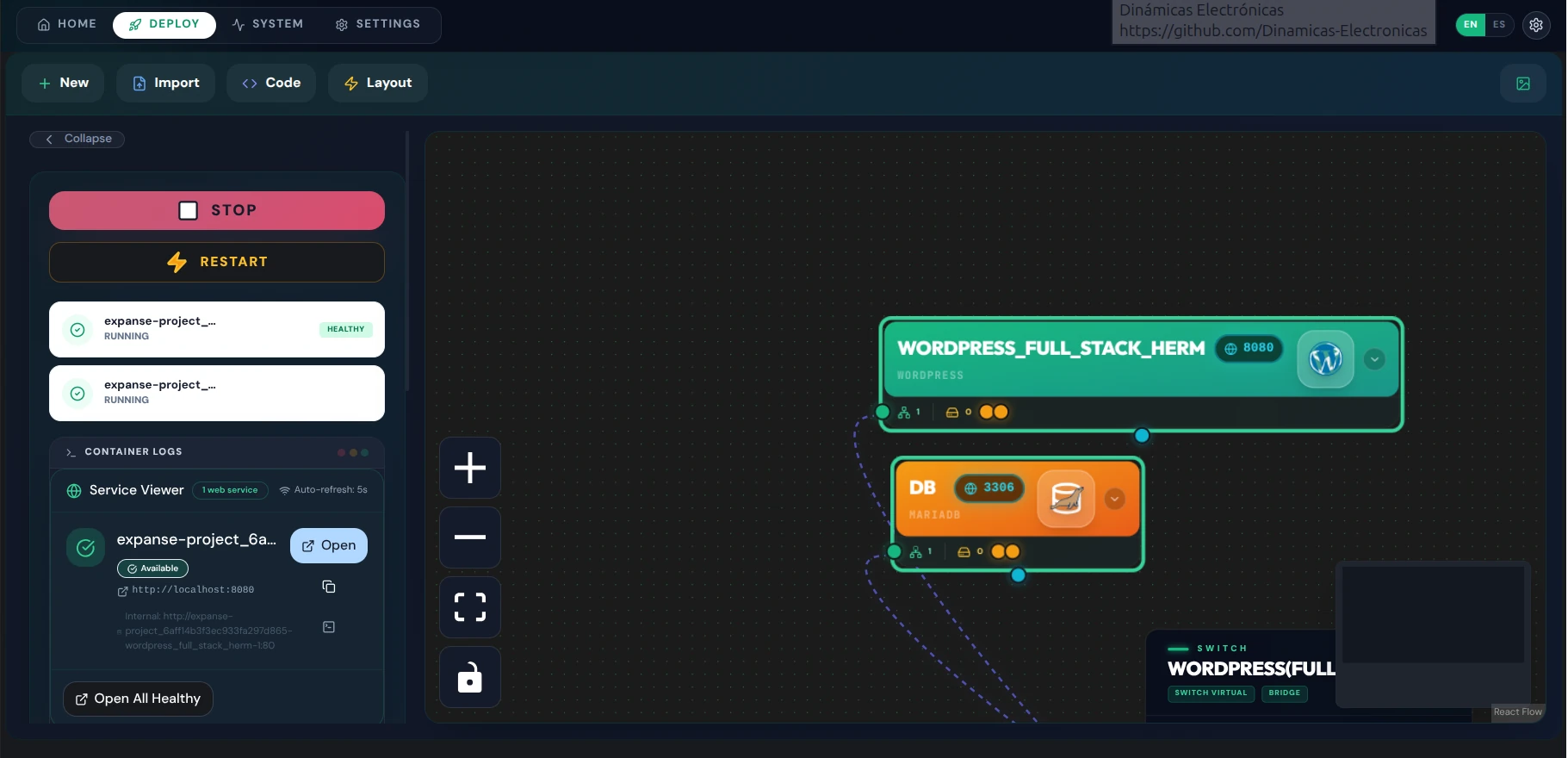
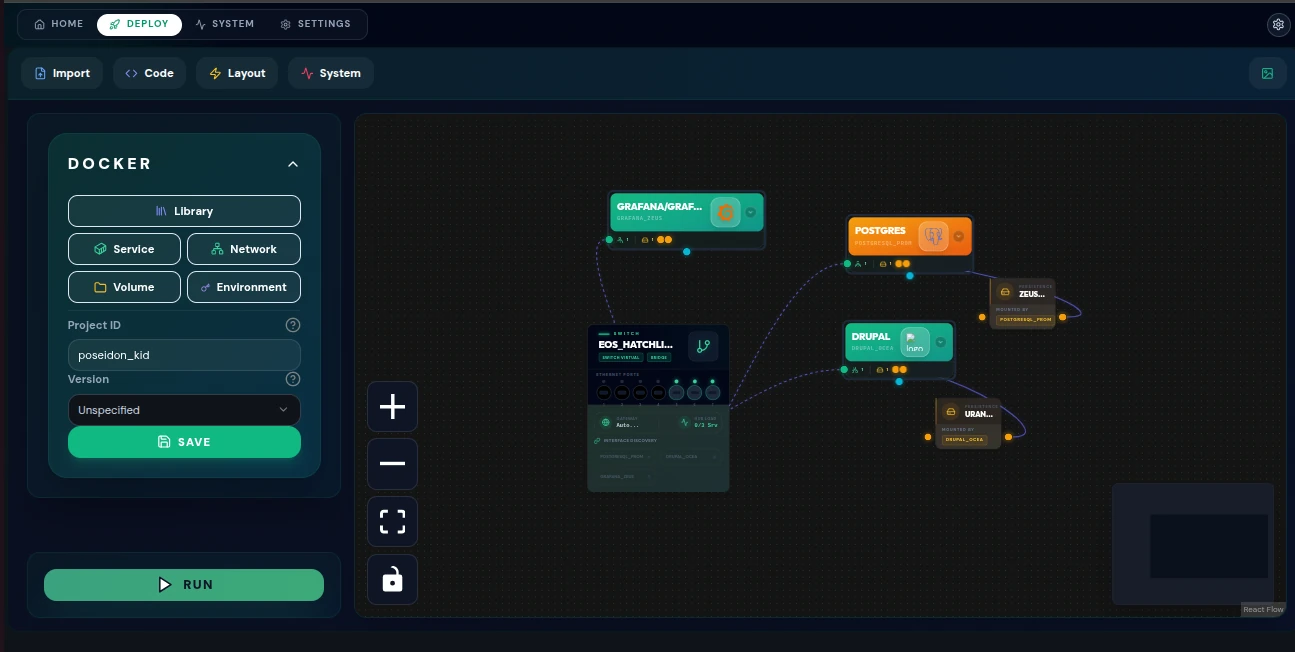
What it is
Design, deploy and operate without touching YAML
Expanse is a self-hosted web application for designing, deploying and operating Docker Compose stacks. Drag services onto the canvas, connect them, configure resources and let the application validate ports, generate the YAML and run Docker Compose against the host engine.
- Editor
Visual canvas
Drag services, connect dependencies and organise the architecture with auto-layout powered by React Flow and ELK.js.
- Library
142 templates
14 categories: databases, AI, automation, CMS, monitoring, networking, messaging, media and more.
- Stacks
25 stacks and 5 HA variants
Complete configurations ready to deploy, with high-availability options for databases and services.
- Deployment
Real Docker, one click
Validates ports, generates the compose file and runs docker compose up against the host Docker Engine.
- Observability
Status, metrics and logs
Check service status, CPU, memory and live logs from the execution panel.
- Terminal
Per-container shell
Open an interactive xterm.js terminal without leaving the browser.
- High availability
HAProxy, replicas and PgBouncer
Load balancing, Compose replicas and connection pooling generated from the HA panel.
- Security
Accounts and sessions
httpOnly JWT, bcrypt, optional MFA TOTP, revocable sessions and an audit log of sensitive operations.
- Operations
Quotas and limits
Per-account project and service quotas, per-container CPU and memory limits and an operations runbook.
- Collaboration
Share and export
Read-only links with configurable expiry and canvas export to PNG.
Workflow
From idea to container in three steps
-
Design
Pick services from the library, drag them onto the canvas and connect dependencies. Adjust ports, variables, volumes and resources.
-
Deploy
Press Run, choose high availability if needed and let Expanse validate port conflicts and generate the Compose file.
-
Monitor
Follow status, metrics and logs; enter any container from the integrated terminal.
Stack
Technologies
 Next.js
 React
 TypeScript
 Tailwind CSS
 Node.js
 MongoDB
 Docker
- React Flow
- ELK.js
- Radix UI
- Zustand
- xterm.js
- Mongoose
- JWT
- Zod
Get started
Run Expanse locally
You need Docker Engine 20.10+ with Compose v2 and buildx, pnpm 12 to generate the secrets, 4 GB of RAM and port 4000 free. MongoDB is included in the stack.
git clone https://github.com/Dinamicas-Electronicas/expanse.git
cd expanse
pnpm generate-secrets
docker compose up -d --build
Open http://localhost:4000. Expanse needs access to the Docker socket to manage the host containers.
Status
Version, license and roadmap
The latest tagged version is v1.1.5. Expanse is released under the MIT license and the repository remains under active development.
Planned roadmap
- v2.0 — multi-cluster management with Kubernetes
- v2.1 — template marketplace with ratings
- v2.2 — GitOps integration with GitHub Actions
- v2.3 — team workspaces with RBAC
- v2.4 — deployment to AWS, GCP and Azure
- v2.5 — execution engine powered by Firecracker (microVMs)
- v2.6 — desktop app for Linux, macOS and Windows
No committed dates. Roadmap taken from the project README.
Firecracker in the execution engine
Expanse's next leap is adding Firecracker as its execution engine: instead of sharing the host kernel, each stack will run in its own microVM. Docker Compose and OCI images stay the same; what changes is how they run, not how you design them.
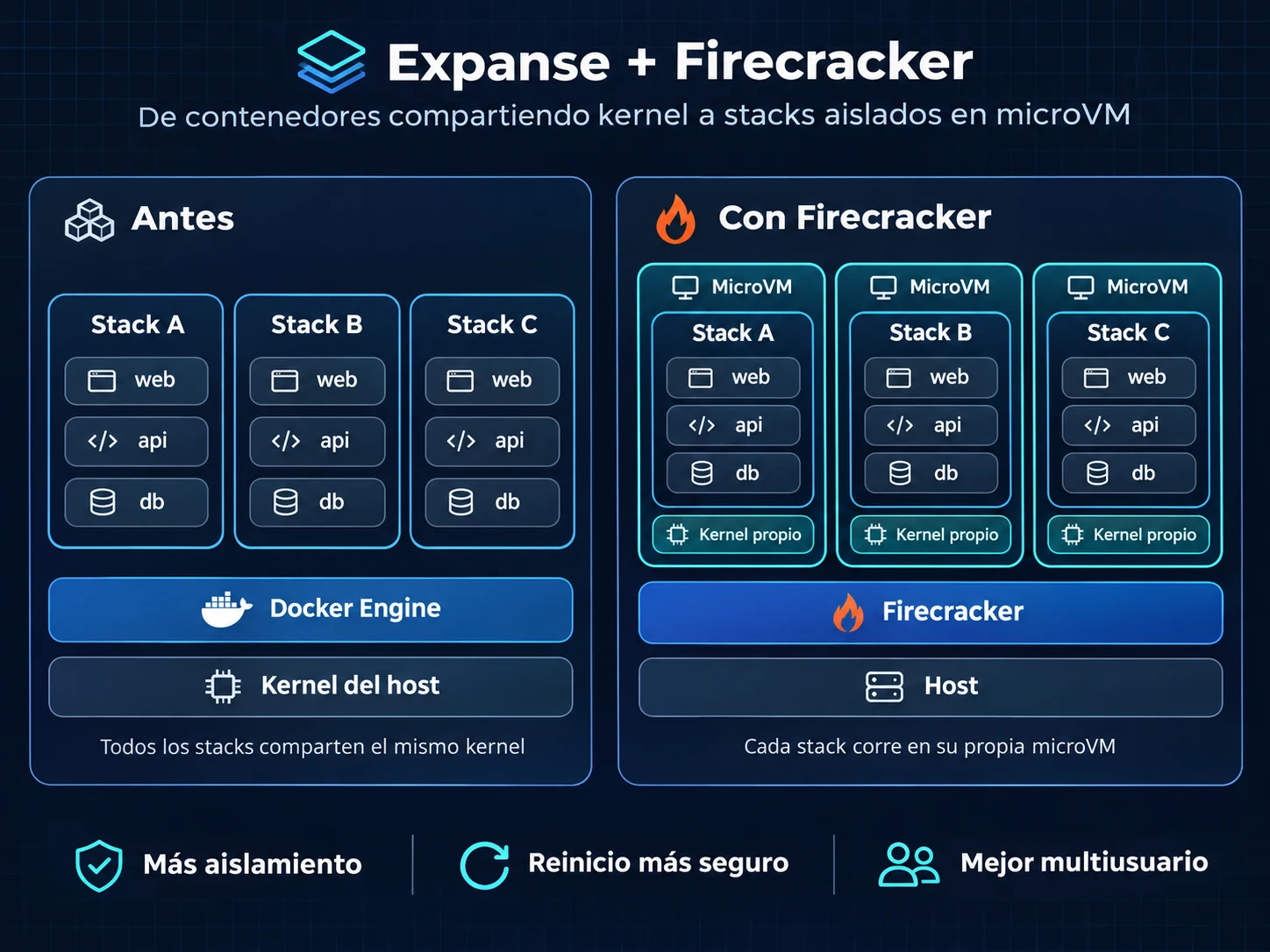
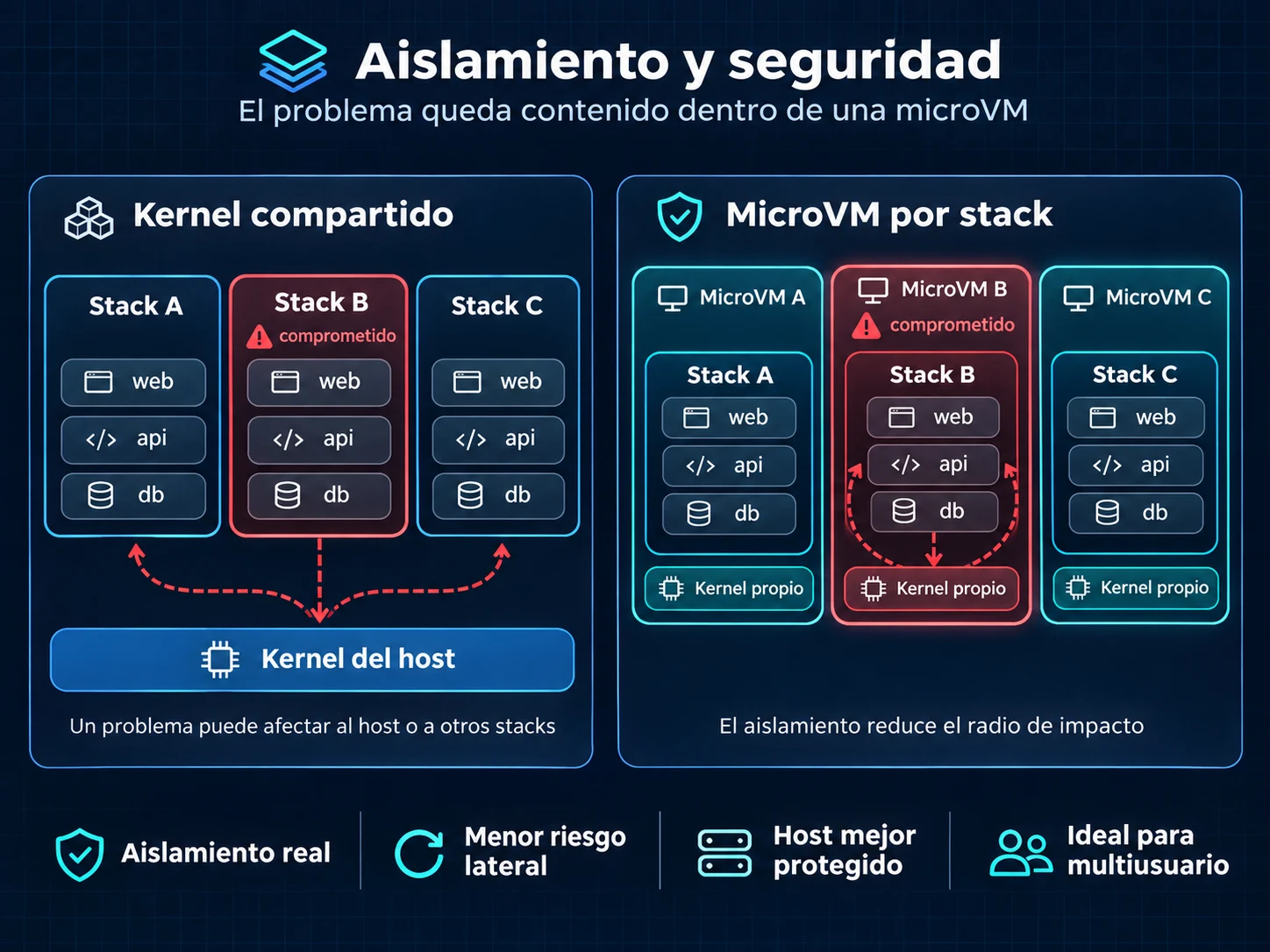
- Isolation
Real microVMs
Each stack runs with its own kernel and its own limits. A crash, a broken dependency or a compromised container cannot reach the host or the other projects.
- Security
Built for multiple users
Per-microVM CPU and memory limits, useful for team workspaces, demos, training and testing third-party templates with stronger guarantees.
- Performance
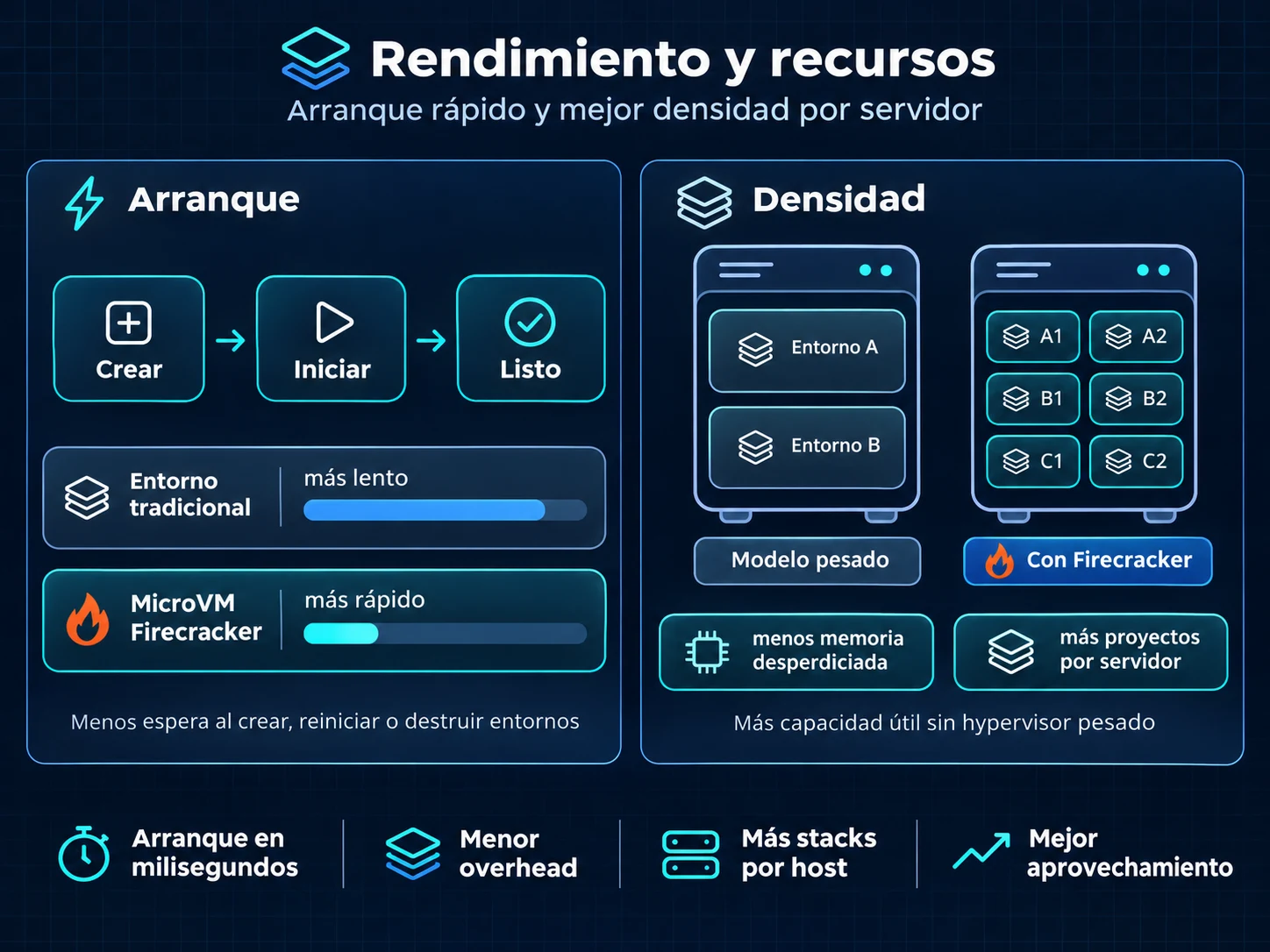
Millisecond boot times
Firecracker is built for ephemeral workloads and starts in a fraction of a second. You feel it when creating, restarting and tearing down environments from the canvas.
- Resources
More stacks per server
No heavyweight hypervisor and no full operating system per environment: less wasted memory and CPU, more projects sharing the same machine.
- Compatibility
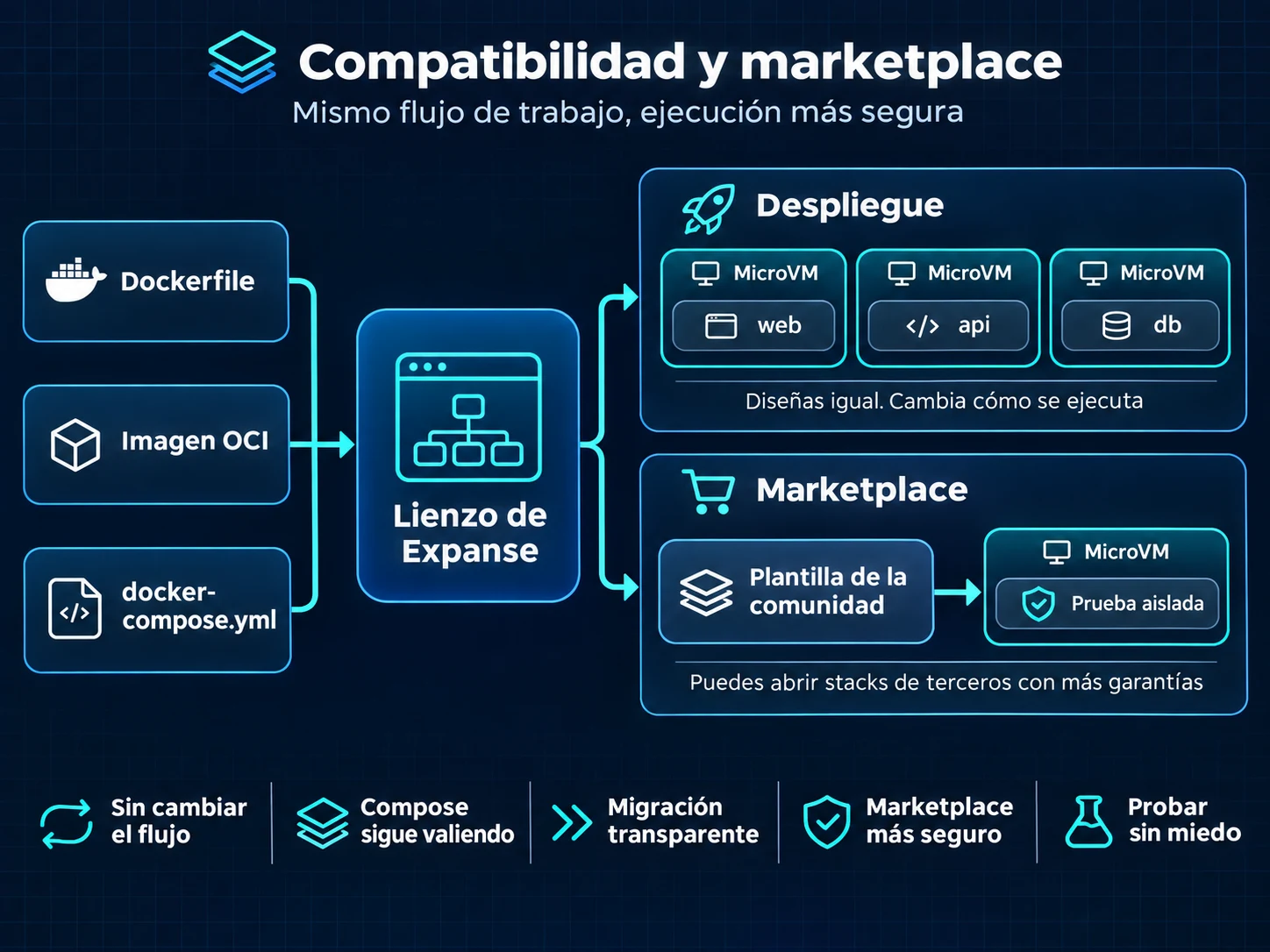
Same workflow
Images, Dockerfiles and Compose files remain valid. The migration is transparent from the Expanse interface.
- Marketplace
Try without fear
Running community stacks in isolated microVMs lowers the risk of opening an unknown template before you trust it.
Desktop application
Expanse started as a self-hosted web application and will remain one. The desktop app will add a direct path for those who prefer not to run a server: install, open and deploy.
- Experience
Native, not a tab
Its own window, menus, keyboard shortcuts and system tray. The canvas no longer depends on a browser or the state of a tab.
- Local Docker
Connect and go
Detects Docker Engine or Podman on the machine and connects without configuring the socket by hand. Ideal for laptop development.
- Alerts
System notifications
Tells you when a deployment finishes, a container dies or a service uses more than expected, even when the window is not in front of you.
- Background
Always watching
It can launch at login and keep stacks monitored with the window closed, just like the self-hosted web mode.
- Platforms
Linux, macOS and Windows
The same engine and the same interface on all three systems, with signed packages and in-app updates.
- Continuity
The same project
Stacks created on the web open in the app and vice versa. Choosing desktop does not mean giving up remote deployment or teamwork.
Want to build together with us?
Technical collaboration, pilots, professional consulting, or simply a conversation about independent technology.
Go to collaboration